Proxy LLM with AgentWeave
AgentWeave supports proxying major LLM providers (OpenAI / Claude / Gemini) through the Proxy LLM feature. Once configured, you get a unified API Key that works with any OpenAI or Anthropic-compatible client.
Create a Proxy LLM Agent
- Go to www.agentweave.ai and sign in
- Click Create Agent and select the Proxy LLM template
- Upload an avatar and enter an agent name
- Select your LLM provider (OpenAI / Claude / Gemini) and configure the settings
- Click Create to finish
Get Your API Key
- Open the Agent detail page
- Navigate to Manage > Api Key
- Click Generate New ApiKey
- Copy the generated key
After setup, you will have:
- API Key:
agentweave-xxxxxxxxxxxxxxxx - Base URL:
https://chat.agentweave.ai/api/v1/chat/proxy/{AgentID}
Integrate with Claude Code
Install Claude Code
npm install -g @anthropic-ai/claude-code
Configure settings.json
Edit ~/.claude/settings.json (Windows: %USERPROFILE%\.claude\settings.json):
{
    "env": {
        "ANTHROPIC_API_KEY": "your_agentweave_api_key",
        "ANTHROPIC_BASE_URL": "https://chat.agentweave.ai/api/v1/chat/proxy/{AgentID}",
        "API_TIMEOUT_MS": "3000000",
        "CLAUDE_CODE_DISABLE_NONESSENTIAL_TRAFFIC": 1
    }
}
Start
Open a new terminal, navigate to your project directory, and run:
claude
Authorize file access when prompted and you're ready to go.
Use Your Own Claude Subscription (optional)
By default, Proxy LLM calls are billed to platform credits. Alternatively, the agent owner can connect their own Claude Pro / Max subscription so calls run on that subscription instead of consuming platform credits.
Currently only Anthropic (Claude) supports subscription mode. OpenAI and Gemini are not supported.
1. Enable subscription mode on the agent
When creating or editing the Proxy LLM agent, in the provider configuration turn on "Use my own subscription" for the Claude (Anthropic) provider, then save.
2. Configure Claude Code
Use the exact same settings.json as above (your AgentWeave API Key + Base URL). No extra configuration is needed.
3. Authorize on first use
Send any message in Claude Code. Because no subscription is connected yet, the proxy replies inline with an authorization link:
🔐 Please authorize your Claude subscription to continue:
https://claude.ai/oauth/authorize?...

After authorizing, the page shows a code. Send it back here (without a leading slash):
    claude-auth <paste code>
-
Open the link in a browser and log in / authorize with your Claude account
-
The callback page shows a one-time code (format
code#state) -
Back in the terminal, send the code with the
claude-authcommand — do not type a leading slash, or Claude Code will treat it as a local command (Unknown command) and it will never reach the proxy:claude-auth <paste the full code> -
The proxy replies "✅ connected". Re-send your original message and it now runs on your subscription.
Only the agent owner can authorize (the subscription is stored under the owner). Other callers will be asked to have the owner connect it.
Re-authorization
Access tokens are refreshed automatically. If your subscription authorization fully expires or is revoked, the next call returns the authorization prompt again — just repeat the claude-auth step.
Integrate with Cursor
Note: Custom API Key configuration requires a Cursor paid plan (Pro or above).
When creating your Proxy LLM Agent on AgentWeave, make sure to select OpenAI as the provider. Cursor only supports OpenAI-compatible models — Claude and Gemini models are not available in this context.
- Open Cursor and go to Settings > Models
- Enter your AgentWeave API Key in the OpenAI API Key field
- Expand Override OpenAI Base URL and enter:
https://chat.agentweave.ai/api/v1/chat/proxy/{AgentID}
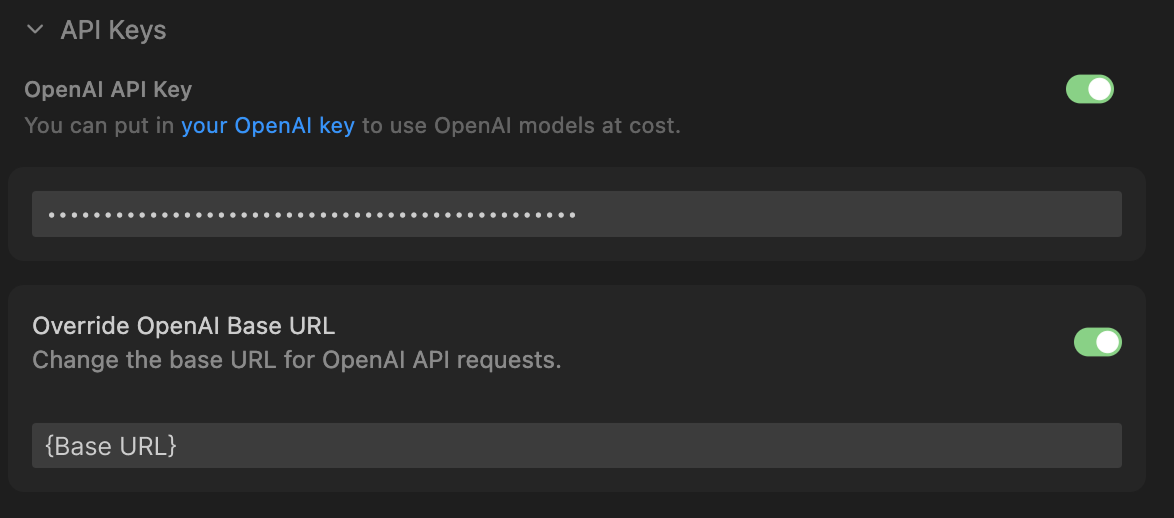
- Save and you're ready to use AgentWeave-proxied models in Cursor
Troubleshooting
Configuration not taking effect
- Close all Claude Code windows
- Open a new terminal and run
claudeagain - Verify the JSON format is valid
- If the issue persists, delete the config files and reconfigure
Claude Code v2.1.69 compatibility issue
When using claude-opus-4-6, set the following environment variables (see Issue #30926):
ENABLE_TOOL_SEARCH=0 CLAUDE_CODE_DISABLE_EXPERIMENTAL_BETAS=1 claude